Database
The app keeps its data in an embedded H2 database, one file in the
per-user data folder that AppPaths picks for each OS. Nothing has
to be installed: on every start Flyway runs any migration in
src/main/resources/db/migration that hasn’t run yet.
| Migration | What it does |
|---|---|
V1__schema.sql |
Creates the four tables below |
V2__demo_data.sql |
Adds two logins, three courses and a few fictional students with attendance |
V3__student_card_id.sql |
Adds student.card_id VARCHAR(64), unique and nullable, and gives demo students 1001–1006 the cards DEMO-1001 to DEMO-1006 |
To change the schema, add a new V4__what_it_does.sql. Never edit a migration that has already
been released: Flyway checks each one’s checksum and refuses to start if one has changed.
Tables
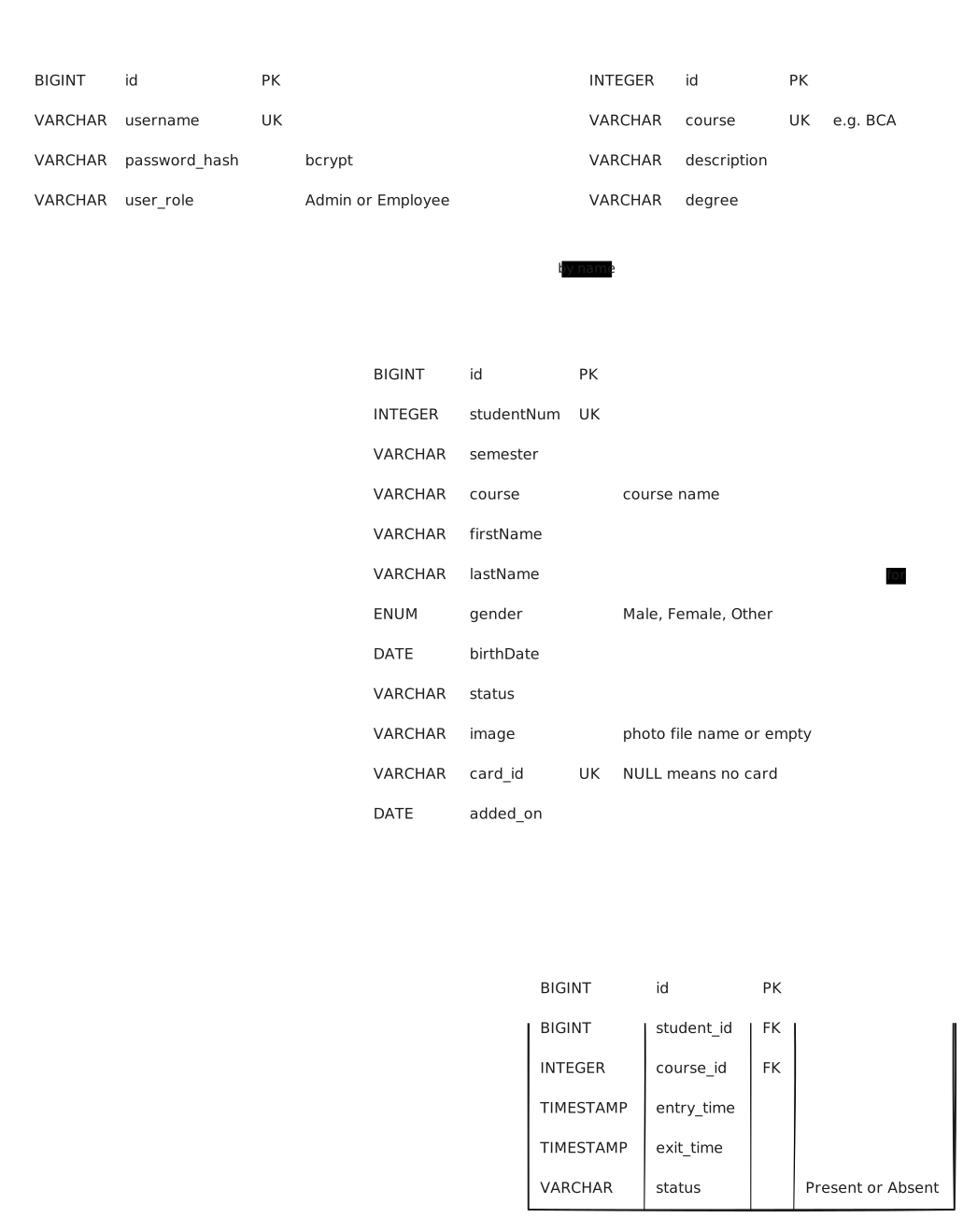
- admin: the people who can log in. Only a bcrypt hash of the password is stored. An Admin can manage users; an Employee can’t.
- course: the courses a student can be enrolled in.
- student: one row per student.
imageholds only a file name. The photo itself is copied intoimages/in the data folder, so the database works on any machine.card_idis what a card reader types when the student’s card is scanned; two students can’t share one. - student_attendance: one row per entry/exit. Deleting a student deletes their attendance
(
ON DELETE CASCADE). A course that has attendance rows can’t be deleted.
Things worth knowing
student.coursestores the course name, not a foreign key. This is kept from the original schema. So the database alone doesn’t stop a course from being deleted while students use it;CourseServicechecks for that first and throwsStillInUseException. Making it a real foreign key would be a good next migration.- Column names mix
camelCaseandsnake_casebecause V1 kept the names of the original database, so the existing SQL didn’t have to change. - Demo logins:
admin/admin123(Admin) andemployee/employee123(Employee).