Design decisions
Why the project is built the way it is, and what would change if a requirement changed.
H2 instead of MySQL
The app started on MySQL, which meant installing and setting up a server before the first run. It now uses embedded H2: the database is a file in the user’s data folder, created on first start. Anyone who clones the repo or downloads an installer can log in a minute later. For a single-user desktop app that is the right trade-off, because there is no shared server to keep running.
The cost is that two computers can’t share data. If the app ever needed that, a server database would be the move. The code is set up so that switch stays small:
- Point the app at the server with
ATTENDANCE_DB_URL(for examplejdbc:mysql://host/attendance),ATTENDANCE_DB_USERandATTENDANCE_DB_PASSWORD. - Add the JDBC driver (
com.mysql:mysql-connector-j) and Flyway’sflyway-mysqltopom.xml, with a matchingrequiresinmodule-info.java. - Give MySQL its own migrations, e.g.
db/migration/mysql, becauseV1__schema.sqluses H2’sGENERATED BY DEFAULT AS IDENTITYwhere MySQL usesAUTO_INCREMENT. Then makeDatabaseMigrationspick the folder from the URL.
Nothing above the DAOs changes. The DAO queries already stick to SQL that both databases accept
(CAST(... AS DATE), CURRENT_DATE, LIMIT ?).
Flyway migrations
The repo used to contain a binary .mv.db file and an old SQL dump that didn’t match it. Now the
schema is plain SQL in src/main/resources/db/migration. Flyway runs any file that hasn’t run
yet and records it in flyway_schema_history. So:
- a fresh install and an upgrade from an older version follow the same path
- schema changes are reviewed in a pull request like any other code
- tests build their databases from the same files the app uses
DAOs and services
The original dashboard controller was 1,800 lines with SQL built by string concatenation, so a
name like ' OR '1'='1 changed what the query did. The SQL now lives in four DAOs and always
uses PreparedStatement. The rules (required fields, duplicates, who may delete what) live in
services. Both can be unit-tested without starting the UI, and the controllers only connect
screens to services.
A full ORM such as Hibernate would be too much for four tables. Plain JDBC keeps every query visible.
bcrypt for passwords
The original login already checked bcrypt hashes, and that stays. The hashing now lives in one
small class, Passwords, and new users get hashes with cost 12 (jbcrypt). Why bcrypt:
- each hash has its own random salt, so equal passwords don’t give equal hashes
- the cost factor makes guessing slow even if the database file is copied
A fast hash like SHA-256 would be the wrong tool here, because speed helps the attacker.
jpackage installers
./mvnw -Pdist package builds an app that doesn’t need Java installed:
jlinkmakes a trimmed Java runtimejpackagebundles that runtime with the app
The release workflow runs this on Linux (folder and .deb), Windows (zipped folder) and macOS
(.dmg) when a v* tag is pushed. Windows gets a zip instead of an .msi because an MSI needs the
WiX Toolset.
jlink only accepts real Java modules, and H2, Flyway and jbcrypt aren’t. So the runtime holds only
JDK modules, and the libraries sit beside it on the module path.
Staying on the latest stack
- Java 25, the current LTS. The Maven Enforcer plugin stops the build with a clear message on
an older JDK. The Maven wrapper (
./mvnw) downloads the right Maven, so only a JDK is needed. - Dependabot opens a pull request each week for new library, plugin and GitHub Actions versions. CI tests each one on Linux, Windows and macOS before it can be merged.
- A Java 27 CI job runs the build on the next JDK. It is allowed to fail, and works as an early warning before the next upgrade.
Card readers
- Keyboard mode. Almost all USB RFID readers, and barcode or QR scanners too, act as a
keyboard: they type the card’s ID and press Enter. So the Attendance screen has one text field
that reacts to Enter. That supports every such device with no drivers and no library, and it
can be tested by typing. Every scan goes through
AttendanceService.scan(cardId): an open entry today means check out, otherwise check in. - A photo, not a live camera. The phone stands in for a reader through a small page the app
serves on the Wi-Fi. Browsers allow a live camera only on https pages, and https on a LAN
address needs a certificate the phone trusts. A photo upload
(
<input type="file" accept="image/*" capture>) works over plain http, and the app decodes the QR code from the photo with ZXing. - Other readers. A serial or Arduino reader, or a reader with its own SDK, would be one more
class that reads IDs and calls
AttendanceService.scanon the UI thread, the same wayPhoneScanServerdoes. Nothing else changes. - Security of the phone server. It is plain http on the local network, so:
- it runs only while “Use phone as scanner” is ticked, and stops on untick, logout and exit
- every URL must start with a random 128-bit token (
SecureRandom); anything else gets 404. Switching it off and on makes a new token - photos over 15 MB and typed IDs over 64 characters are refused
- it can only check students in and out, never read or change other data
Anyone on the same network who sees the pairing QR code could scan cards, so it is meant for a trusted Wi-Fi.
Known gap: database work on the UI thread
Every database call runs on the JavaFX application thread, the same thread that draws the window. With a local H2 file and a few hundred rows this takes milliseconds, so nobody notices. With a remote database or large tables, the window would freeze during each call.
The next step would be to run each service call in a javafx.concurrent.Task on a background
thread. The table would be filled in setOnSucceeded, which runs back on the UI thread, and an
alert shown in setOnFailed. The services don’t touch the UI, so they would not need to change.
A second small gap: if the database can’t be set up at start, JavaFX prints the error and exits. A dialog would be friendlier.
UI design
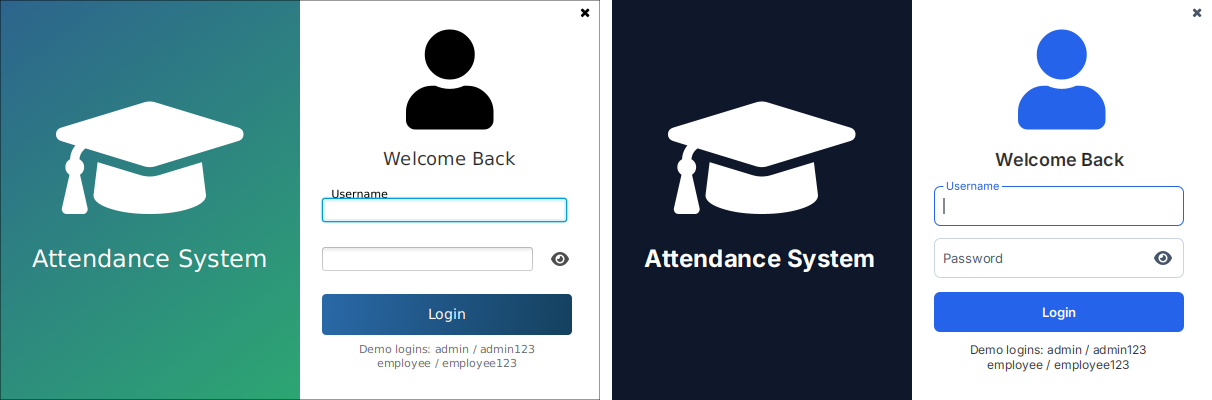
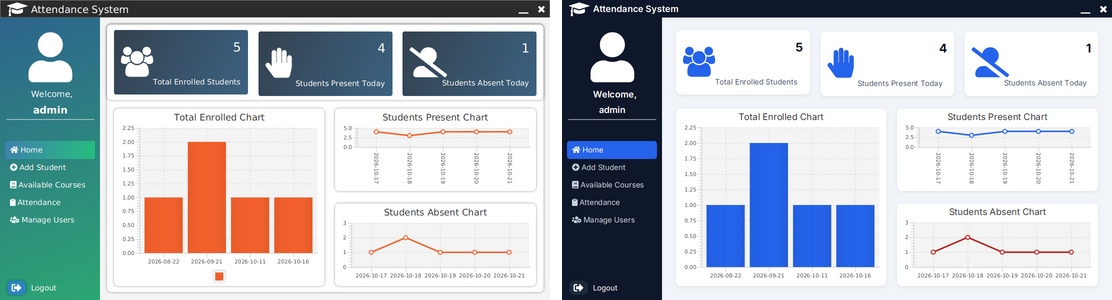
The old look mixed gradients and colors chosen screen by screen. The refresh changed only CSS and small FXML spacing, so the UI tests passed unchanged.
- Design tokens. Every color is defined once in
theme.css(-color-primary,-color-surface,-color-text, …). The other stylesheets use only these names. A new look, or a dark mode, means editing one file. - Contrast. Text colors meet WCAG AA, at least 4.5:1 against their background. For
example, muted text
#475569on white is about 7.6:1. - One font. Inter (SIL Open Font License) ships in the app and is loaded at start, so the look is the same on every OS. It uses a fixed size scale: 12 / 13 / 15 / 18 / 24 px.
- Roles, not one-offs. Buttons come in primary, secondary and danger styles. Keyboard focus
gets a visible ring (
:focus-visible) that mouse clicks don’t trigger. The sidebar marks the open screen with a style class instead of inline styles set from Java. - MaterialFX’s own stylesheet is not loaded. Loading it for the whole app would restyle every
screen. So
login-style.cssstyles just the two MaterialFX fields on the login screen. One example: their inner text box is made transparent, or it would hide the floating label.