Build and release
How GitHub Actions tests every change and turns a version tag into apps that run without Java. The commands to run these steps yourself are in the README: Running the tests, Building a version that runs without Java and Publishing a release.
CI: every push and pull request
.github/workflows/ci.yml runs ./mvnw -B verify on Linux, Windows and macOS with Java 25. A
failure on one OS doesn’t cancel the others (fail-fast: false), so one run shows every broken OS.
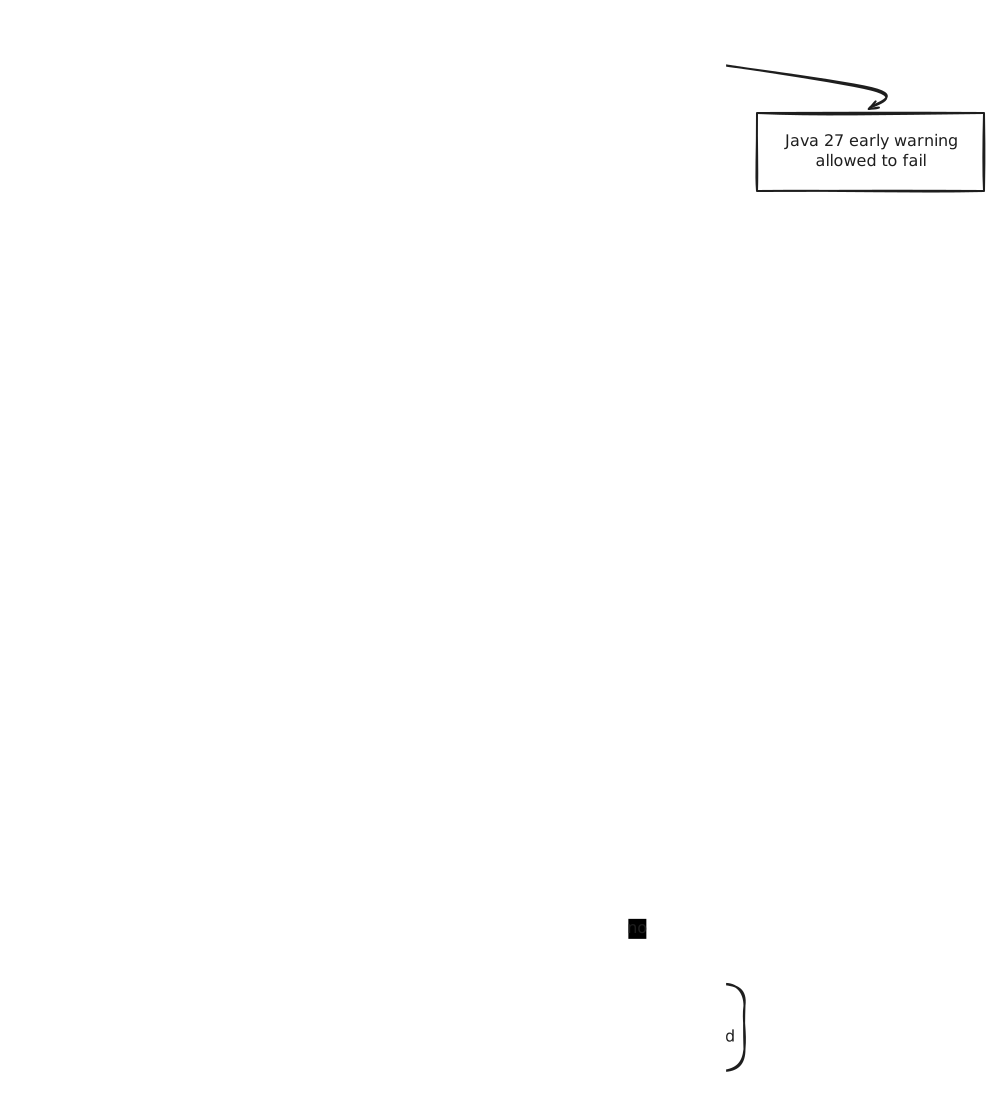
- The Maven wrapper downloads the Maven version in
.mvn/wrapper/maven-wrapper.properties, so CI and your machine build with the same Maven.setup-javacaches~/.m2, so libraries are downloaded once. - Linux runners have no screen, so
xvfb-rungives the TestFX tests a virtual one. Windows and macOS runners have a real desktop. - The test and coverage reports are uploaded only when a job fails. Open the failed run, scroll to
Artifacts, and download
reports-<os>. - The workflow can only read the repository (
permissions: contents: read).
Release: building the binaries
Pushing a tag that starts with v runs .github/workflows/release.yml. Each OS builds its own
binaries, because jlink and jpackage can only build for the OS they run on.
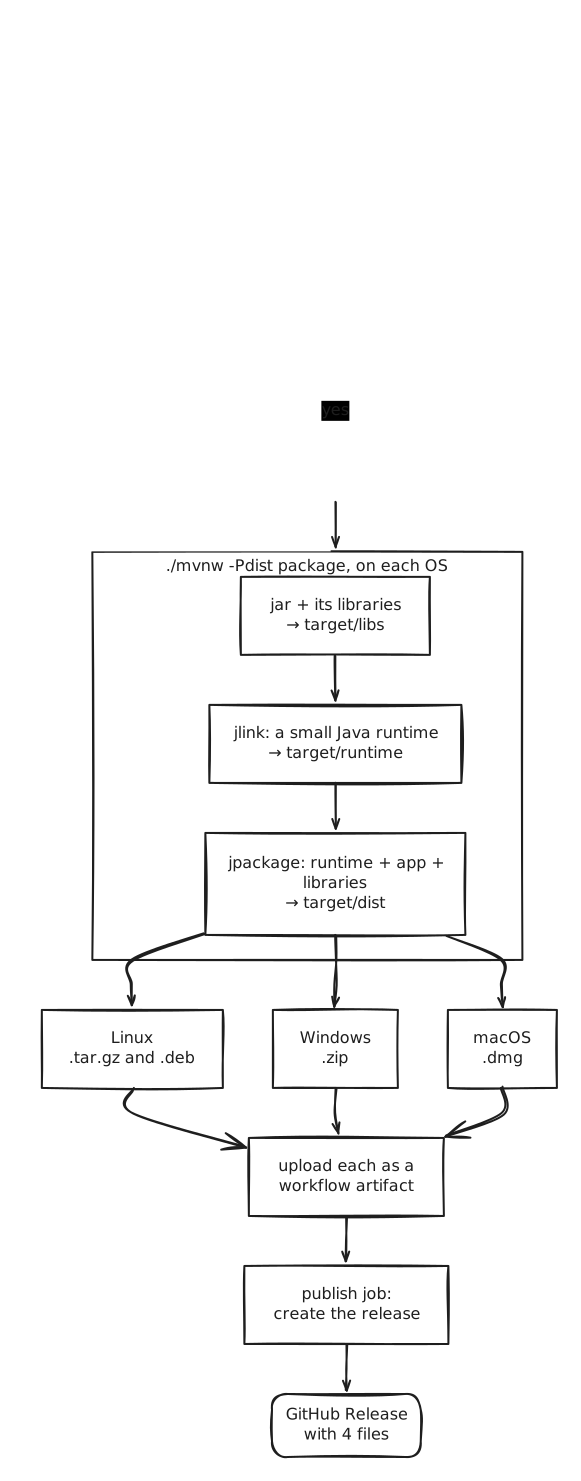
The dist profile, step by step
-Pdist turns on extra steps in pom.xml that all run in Maven’s package phase, in this order:
| Step | Plugin | What it does |
|---|---|---|
| 1 | maven-jar-plugin |
Writes the app’s jar to target/libs |
| 2 | maven-dependency-plugin |
Copies every runtime library (JavaFX, H2, Flyway, ZXing, …) next to it |
| 3 | maven-clean-plugin |
Deletes an old target/runtime, because jlink refuses to overwrite one |
| 4 | exec-maven-plugin |
Runs jlink from the JDK that runs Maven. The module list is <argument>--add-modules</argument> in the dist profile |
| 5 | jpackage-maven-plugin |
Builds target/dist from the runtime and target/libs, starting the module com.bsmi.attendancesystem |
The properties that change the result, all set with -D on the command line:
| Property | Default | Used for |
|---|---|---|
dist.version |
1.0.0 |
The version shown by the installer. The release sets it from the tag |
dist.type |
APP_IMAGE |
APP_IMAGE is a plain folder; DEB, MSI or DMG build an installer |
dist.shortcuts |
false |
Menu entry and shortcuts (Linux and Windows) |
dist.linux-deps |
empty | Packages the .deb depends on, libgtk-3-0 in the release |
What each OS builds
| Runner | Commands | File |
|---|---|---|
| ubuntu-latest | -Pdist clean package, then a tar of target/dist/AttendanceSystem |
AttendanceSystem-<version>-linux-x64.tar.gz |
| ubuntu-latest | -Pdist package -Ddist.type=DEB ... (needs fakeroot) |
AttendanceSystem-<version>-linux-amd64.deb |
| windows-latest | -Pdist clean package, then 7z of the folder |
AttendanceSystem-<version>-windows-x64.zip |
| macos-latest | -Pdist clean package -Ddist.type=DMG |
AttendanceSystem-<version>-macos-arm64.dmg |
- The release skips the tests (
-DskipTests): CI has already tested the tagged commit. Push the tag only after CI is green on that commit. - Windows gets a zip and not an MSI, because an MSI needs the WiX Toolset on the runner.
macos-latestis an Apple silicon Mac, so the DMG isarm64only.- Only the
publishjob can write to the repository (contents: write), and it runs only after all three OS builds succeed. One failed OS means no release at all, not a half-finished one.
The version rule
The tag must look like v1.2.0 and its first number must be 1 or more. The macOS DMG refuses a
version that starts with 0 (“The first number in an app-version cannot be zero or negative”), which
is why v0.1.0 failed and the first release is v1.0.0. The release workflow checks the tag first
and stops with this explanation, so a bad tag fails in seconds instead of after the builds.
To retry a failed release, delete the tag and push it again:
git push origin :refs/tags/v1.2.0 && git tag -d v1.2.0
git tag v1.2.0 && git push origin v1.2.0
Validation and tests
What checks the build and release, and how to check them yourself.
| What | How it is checked | Where |
|---|---|---|
| Java and Maven versions | Enforcer stops the build on Java < 25 or Maven < 3.9 with a clear message | every build |
| Code | 419 tests, see Architecture: Tests | ci.yml, 3 OS |
| Coverage | JaCoCo fails verify below 90% line coverage in dao, service, scanner |
ci.yml |
| Newer Java | The same build on Java 27, allowed to fail | ci.yml, newest-java |
| Library updates | Dependabot pull requests, each tested by CI before merging | weekly |
| Tag format | v<1 or more>.<n>.<n>, checked before anything is built |
release.yml |
| Binaries | All three OS builds must succeed before publish runs |
release.yml |
| Workflow files | actionlint finds YAML, expression and shell mistakes | by hand, see below |
| Diagrams | Each SVG in docs/diagrams still holds its Excalidraw drawing, so it can be edited |
by hand, see below |
Checking the workflow files before pushing them:
podman run --rm -v "$PWD":/repo:Z,ro -w /repo docker.io/rhysd/actionlint:latest \
  .github/workflows/ci.yml .github/workflows/release.yml
No output means no problems.
The diagrams in these docs are Excalidraw drawings saved as SVG files in
docs/diagrams. Each file is both the picture GitHub shows and the drawing itself. To change one:
- Open excalidraw.com and drag the
.excalidraw.svgfile onto the page. - Edit it, then choose Export image, SVG, with Embed scene switched on.
- Save it over the old file with the same name.
Without Embed scene the file is only a picture and can’t be opened for editing again. This lists any diagram that lost its drawing, so no output means all of them are still editable:
grep -L 'application/vnd.excalidraw+json' docs/diagrams/*.svg
Checking a release build by hand, on the OS you are on:
./mvnw -Pdist clean package -Ddist.version=1.2.0- Start
target/dist/AttendanceSystem/bin/AttendanceSystem(Windows:AttendanceSystem.exe). - Log in as
admin/admin123, open Attendance, scanDEMO-1001, and tick “Use phone as scanner”. That last step provesjdk.httpservermade it into the runtime. - After a release, download each file from the release page and repeat step 3 on that OS.
Recommendations
In order of how much they would help users, not how easy they are:
- Sign the apps. Today Windows SmartScreen and macOS Gatekeeper warn about an unknown
developer, and users must click past it (the README explains how). Signing needs a Windows
code signing certificate and an Apple Developer account ($99 a year) for notarization; jpackage
has
--win-*and--mac-signoptions for both. Worth doing once the app has real users. - Smoke-test the binaries in the release. The release only checks that jpackage succeeded,
not that the app starts. A step that starts the packaged app with
-Dattendance.home=<temp>underxvfb-runfor a few seconds and checks it didn’t crash would catch a missing jlink module before users do. - Require CI before merging, once someone else contributes. Branch protection with required
status checks on the three
Java 25 on <os>jobs would stop a red pull request from merging. Not needed while one person commits directly tomain. - Pin the actions to commit SHAs (
actions/checkout@<sha> # v7). A tag likev7can be moved, a SHA can’t. Dependabot keeps pinned SHAs up to date too. - Add checksums to the release notes. GitHub shows a SHA-256 for each release file, so users
can already verify a download. A
SHA256SUMSfile would make that scriptable. - An Intel Mac build, only if someone asks for it. It would need a
macos-15-intelrunner in the matrix, the last Intel image GitHub offers. - Watch the runner images.
ubuntu-latest,windows-latestandmacos-latestmove to new OS versions over time. On newer Ubuntu the GTK package is calledlibgtk-3-0t64; it still provideslibgtk-3-0, so the.debdependency works, but check it when the runner changes.